Estimated time
00:07:24
7 minutes, 24 seconds
Effective speed
180 Mbps (22.5 MB/s)
At 100% efficiency
00:06:40
Data to transfer
10 GB (80,000,000,000 bits)
Download Time Calculator
Use this download time calculator to estimate how long any file will take to download based on file size, connection speed, and real-world network efficiency.
Estimate transfer time from explicit assumptions
Enter a positive file size, choose its unit, then enter a positive connection speed and its unit. Set efficiency from 1% to 100%. The result updates automatically. Efficiency is a scenario you supply; the page does not measure your network or predict congestion.
Formula and worked example
Transfer seconds = file bits ÷ (connection bits per second × efficiency ÷ 100). For 4.7 GB in decimal units, 100 Mbps and 80% efficiency, the file contains 37.6 billion bits and the effective rate is 80 million bits/s. The estimate is 470 seconds, or 7 minutes 50 seconds. At the full stated rate it would be 376 seconds, or 6 minutes 16 seconds.
Keep bits, bytes and binary prefixes separate
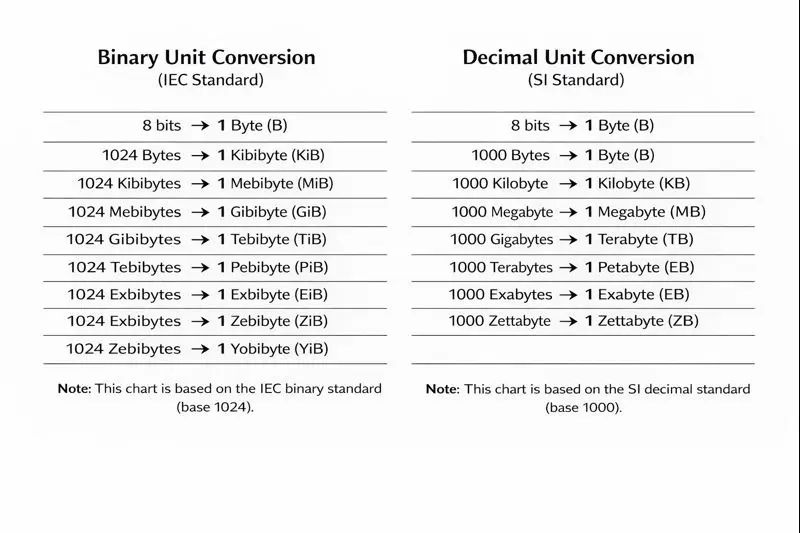
One byte contains eight bits: 100 Mbps is 12.5 MB/s before losses. The file-size selector on this page uses decimal KB, MB, GB and TB, based on powers of 1,000. It has no GiB option. If a source reports GiB, convert it to bytes first: 1 GiB = 1,073,741,824 bytes. Enter that byte count with B selected instead of treating GiB as GB.
Understand what the estimate excludes
The output models transferring the stated data at a constant effective rate. Server limits, pauses, competing traffic, verification, decompression and installation can add time. Use an observed rate and a separate buffer when a deadline depends on completion.
Binary Byte Conversion Chart
Download time calculator FAQ
How do I calculate download time for a 100 GB file at 300 Mbps?
Enter 100 GB, select 300 Mbps, then set your expected efficiency. This download time calculator instantly returns a practical estimate and a perfect-line benchmark.
Why does my download time calculator result differ from the app store timer?
App stores often include server throttling, decompression, verification, and post-download install steps. This file download time calculator models transfer time only.
Should I use Mbps or MB/s in a download speed calculator?
Use whichever unit your source displays. This internet download time calculator supports both and converts accurately behind the scenes.
What efficiency should I use in a Wi-Fi download time calculator?
A common planning range is 60% to 90%. Start around 75%, compare with real transfers, then adjust your download time calculator profile.
Can I use this calculator for cloud backup restores and ISO images?
Yes. This download time calculator works for any transfer where file size and link speed are known, including restores, installers, and archive bundles.
Last updated: October 26, 2026