Monday
0.00 hours - Rounded in
- --:--
- Rounded out
- --:--
| Day | Clock In | Clock Out | Break Minutes | Rounded In | Rounded Out | Total Hours |
|---|---|---|---|---|---|---|
| Monday | --:-- | --:-- | 0.00 | |||
| Tuesday | --:-- | --:-- | 0.00 | |||
| Wednesday | --:-- | --:-- | 0.00 | |||
| Thursday | --:-- | --:-- | 0.00 | |||
| Friday | --:-- | --:-- | 0.00 | |||
| Saturday | --:-- | --:-- | 0.00 | |||
| Sunday | --:-- | --:-- | 0.00 |
Total Hours
0.00
Regular Hours
0.00
Overtime Hours
0.00
Double-Time Hours
0.00
Regular Pay
$0.00
Overtime Pay
$0.00
Double-Time Pay
$0.00
Gross Pay
$0.00
The payroll summary is an estimate based on the hourly rate, thresholds, multipliers, breaks, and rounding settings entered above. It excludes taxes, premiums, deductions, and rules that are not represented by the controls.
Overtime eligibility, break treatment, rounding, and pay rates are not universal. This time card calculator performs the configured arithmetic; it does not determine legal entitlement or payroll compliance. Confirm the settings against the worker's location, contract, and your organization's policy before paying or invoicing.
If you only need to stress-test rounding policies before building a schedule, open the Time Clock Rounding Calculator for standalone punch scenarios.
Enter daily clock-in, clock-out, and break values to total a week. The time card calculator can apply configurable rounding, overtime thresholds, and pay multipliers, then export the arithmetic and settings to Excel.
This guide describes the code's calculation order and limits. Review each setting before using the worksheet in a payroll, billing, or timesheet workflow.
The rounding increment moves each punch to a 1, 5, 6, 10, 15, or 30-minute grid. Nearest mode rounds exact ties down; Up and Down always move in the selected direction unless a punch is already on the grid.
Grace is applied only to clock-in values that fall within the selected number of minutes after the top of an hour. Clock-out values use normal rounding. The control models arithmetic and does not approve a workplace attendance policy.
Enter one clock-in and one clock-out per day. If clock-out is the same as or earlier than clock-in, the calculator treats it as the following day and labels the rounded clock-out with (+1d). Split shifts require a separate calculation.
Break minutes are subtracted after both punches are rounded. Enter only the break time that should be deducted under the applicable policy; the calculator cannot decide whether a meal or rest period is paid.
Weekly mode moves hours above the entered weekly threshold into the overtime bucket. Daily mode applies the daily overtime and double-time thresholds separately to each row. The defaults are examples that you can change; they are not universal legal rules.
The calculator multiplies regular, overtime, and double-time hour buckets by the entered hourly rate and multipliers. The Excel file records those settings with the rows and totals, but it is an estimate rather than a payroll-system record.
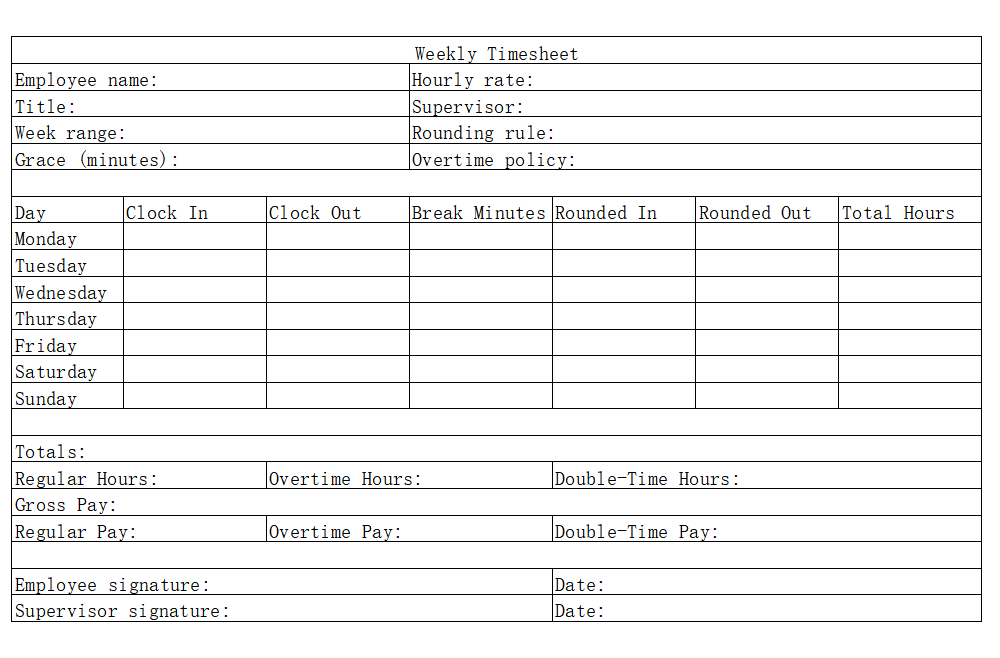
A weekly grid makes it easier to compare raw punches, rounded punches, deducted breaks, and daily totals in one place. Empty rows contribute zero hours, and an overnight row is marked when clock-out falls on the following day.
The controls expose the assumptions instead of choosing them silently. Set the rounding grid, direction, top-of-hour clock-in grace, overtime thresholds, pay rate, and multipliers. Results update in the browser, and the export records the selected values beside the calculated totals.
The calculator can total a simple office week, an overnight shift, or a draft staffing scenario. It supports one shift and one break deduction per day; multiple split shifts, premiums, paid breaks, taxes, and location-specific rules must be handled separately.
Start with the rule supplied by the responsible employer, client, or payroll system. A one-minute increment changes less data than a larger grid. Grace on this page affects clock-ins shortly after the top of an hour; it is not a general lateness rule.
Each weekly row inside the time card calculator captures the primary shift in a familiar layout. Rounded punches appear beside the raw inputs, and when you record break minutes the calculator refreshes the daily and weekly totals without extra steps.
The summary separates regular, overtime, and double-time buckets using only the thresholds entered on this page. Multipliers turn those buckets into a gross-pay estimate. The calculation does not interpret statutes, contracts, eligibility classifications, premiums, or exceptions.
FP&A teams fold the time card calculator into rolling forecasts to quantify the labor impact of new service offerings. By modeling overtime thresholds inside the time card calculator, you can compare staffing mixes before presenting budgets. The variance view of the timecard calculator lets analysts contrast ideal schedules with actual punches and quickly spot profit leaks. A carefully tuned time card calculator becomes the bridge between weekly staffing conversations and quarterly board reviews.
Small businesses love how the time card calculator turns hours into projected payroll liabilities without demanding a full accounting platform. Real-time gross pay and overtime previews help owners stage cash reserves and coach teams before costly patterns escalate.
For a planning discussion, save separate exports for each set of thresholds or multipliers and label the scenario. The file shows which inputs produced the estimate, but a qualified reviewer must still decide whether those settings match the applicable agreement or law.
Healthcare schedules may contain overnight work, paid or unpaid breaks, and special premiums. This page can model a basic row, but it is not a clinical staffing, reimbursement, or regulated payroll record. Do not enter patient information.
A field-service estimate can include one start, one end, and a break deduction for each day. The page has no GPS, timezone conversion, job-code, or warranty classification feature, so keep those records in the source system.
Studios adopt the time card calculator to align retainer hours with production sprints, design reviews, and client approvals. The time card calculator shows how grace periods influence actual billable utilization and informs change-order conversations. Producers treat the timecard calculator as a backstage command center for freelancers who log in from different time zones. Ultimately, the time card calculator reduces write-offs by aligning recorded hours with contracted deliverables.
Operations teams stream the time card calculator outputs into dashboards that flag staffing gaps before they hit payroll. Structured exports feed low-code workflows that deliver reminders, approvals, and summaries without building a new spreadsheet every week.
Product squads extend the timecard calculator with widgets that surface project KPIs next to shifts, keeping everyone zeroed in on throughput, margin, and utilization.
Supervisors onboard faster when the time card calculator doubles as their playbook. Interactive tips explain how grace windows, rounding increments, and overtime multipliers change totals so new managers can coach from day one.
Microlearning playlists and quick-reference checklists keep the calculator sticky, turning it into the nerve center for daily schedule adjustments and staffing huddles.
The current integration is an XLSX download. It does not provide an API, payroll connection, kiosk mode, BI connector, or forecasting feature.
If you move the export into another system, verify dates, times, decimal formats, and the meaning of each pay bucket after import.
Last updated: September 17, 2026