Accurate Work Hour Calculation: The Critical Role of Time Rounding
Many businesses invest in tools for payroll, yet still struggle with frustrating inaccuracies. The problem often isn't the final calculation, but the data that feeds it. This guide explores why true accuracy in work hour calculation begins before a calculator is ever touched—it starts with the foundational process of time clock rounding.
The 'Garbage In, Garbage Out' Problem in Payroll
In the world of data, the principle of 'Garbage In, Garbage Out' (GIGO) reigns supreme. If you input flawed or inconsistent data into a system, you will inevitably get flawed or inconsistent results. This is the single biggest challenge in achieving accurate employee time calculation. Even the most advanced payroll software is powerless if the timesheet data is a chaotic mix of unstandarized entries like 8:01 AM, 7:58 AM, and 8:03 AM.
Manually processing these varied times is not only tedious but also a minefield of potential errors. Which employee should be paid from 8:00 AM? Is it fair to penalize someone for being two minutes early or one minute late? Without a standard policy, these decisions become arbitrary, leading to unfairness and compliance risks. This is the core problem that a simple work hour calculator tool alone cannot solve.
Time Clock Rounding: The Foundation of Accurate Payroll
Time clock rounding is the practice of changing punch-in and punch-out times to a predefined interval, such as 5, 10, or 15 minutes. It can make values uniform, but it also changes the source record. Whether a rounding policy is permitted or appropriate must be assessed separately.
How Rounding Creates Fairness and Efficiency
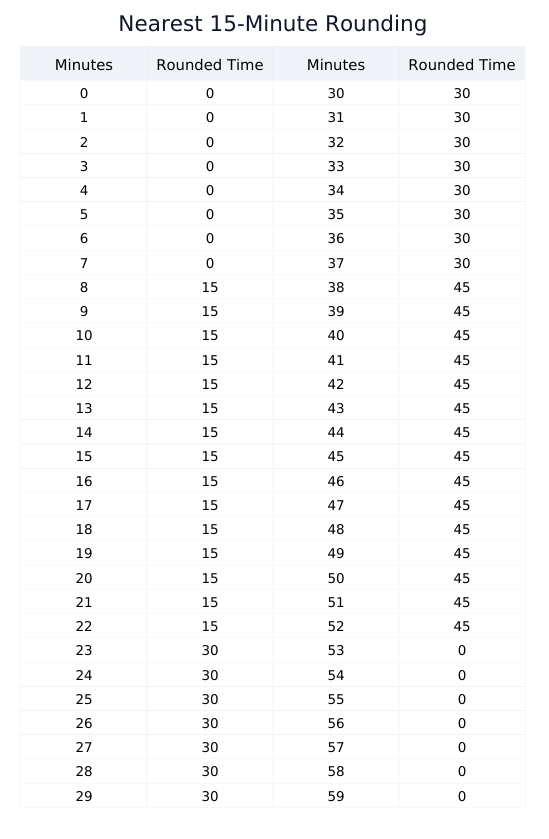
For example, one nearest-15-minute formula maps 8:01 through 8:07 to 8:00 and 8:08 through 8:14 to 8:15. Applying one formula consistently does not by itself prove neutrality across actual records; compare the rounded totals with preserved raw punches.
The interactive Time Clock Rounding Calculator & Guide demonstrates the numerical effect of several increments. It does not approve them as workplace policies.
Visualizing the Rounding Rules: Chart Examples
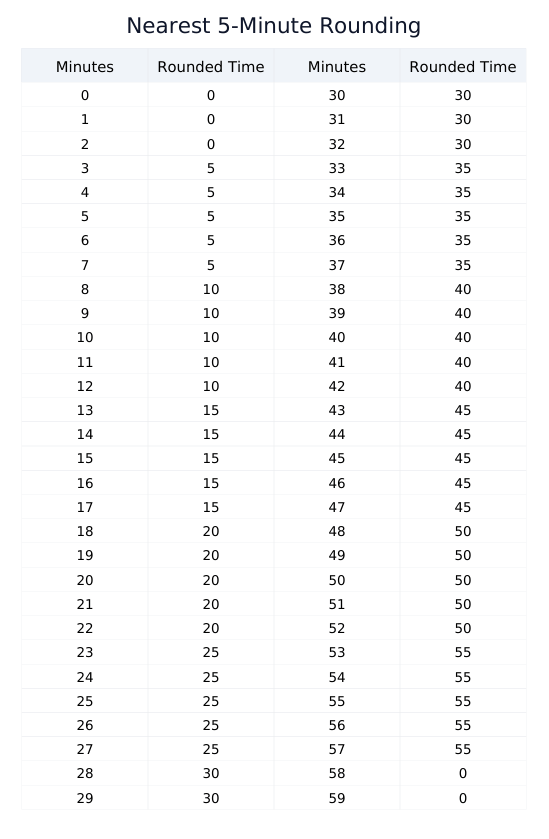
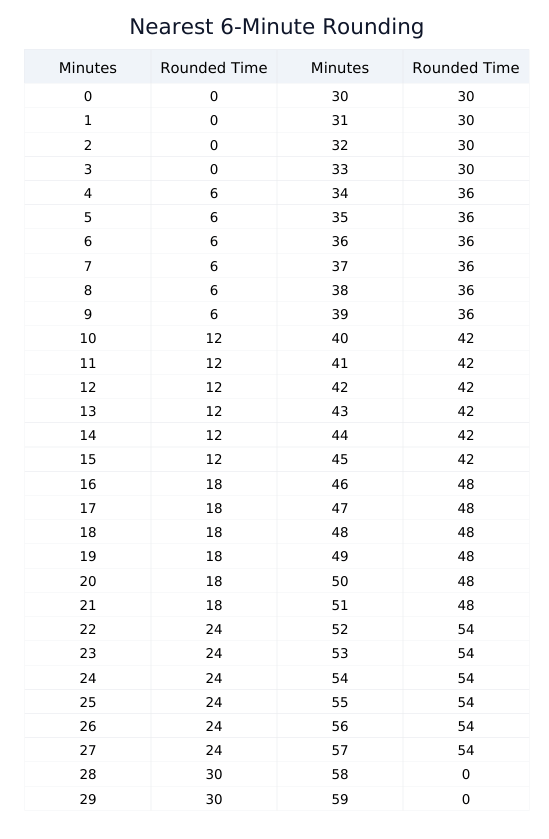
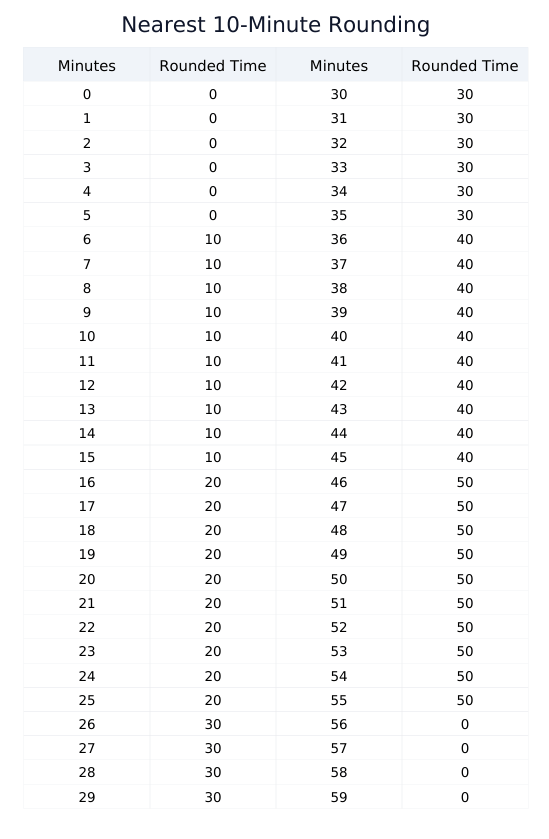
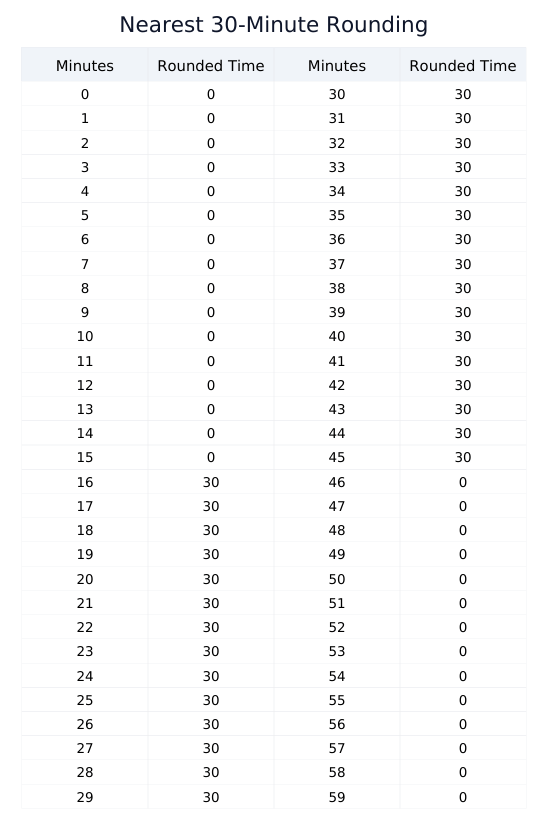
To make these concepts crystal clear, visual charts are invaluable. They provide an at-a-glance reference for how different rounding policies affect time entries. Understanding these charts is the first practical step in ensuring any work time calculate process is built on accurate data. For a convenient offline reference, you can also download a consolidated Time Clock Rounding Rules PDF for Work Hour Calculation Reference. Below are the five most common rounding rules used in business.
5-Minute Rule Rounding Chart
6-Minute Rule (Tenth of an Hour) Rounding Chart
10-Minute Rule Rounding Chart
15-Minute Rule ("Rule of 7") Rounding Chart
30-Minute Rule Rounding Chart
Building a Reliable Workflow for Employee Time Calculation
Thinking of work hour calculation as a workflow rather than a single action helps expose where a value changed. One review sequence is:
- Capture Raw Punch Times: Use a reliable system to capture the exact time an employee starts and stops work.
- Apply a Standard Rounding Policy: This is the critical step. Process the raw punch times through a consistent rounding rule (e.g., rounding to the nearest quarter-hour). This normalizes the data.
- Calculate Gross Duration: Subtract the rounded start time from the rounded end time.
- Deduct Unpaid Breaks: Subtract any unpaid break periods (e.g., a 30 or 60-minute lunch) to get the final number of hours worked.
- Convert to Decimal Format: For payroll, convert the final time into decimal hours (e.g., 7 hours and 45 minutes becomes 7.75 hours). This is the format that payroll systems use for monetary calculations.
A good work hour calculator tool can automate steps 3-5, but only after you have correctly completed step 2. The integrity of the entire process hinges on the quality of the rounding policy.
Handling "Just a Few Minutes": A Risky Gamble vs. a Smart Policy
Beyond simple fairness, a primary driver for precise employee time calculation is maintaining trust and accountability. It's a widely accepted business principle that employees should be compensated for all time they spend on work-related activities. Consistently failing to account for small increments of time, such as tasks performed shortly before or after official shifts, can lead to disputes and erode employee morale.
Small increments accumulate, so the source record should not be discarded. Document how each adjustment was made and confirm the applicable rule; a calculator cannot determine whether time is compensable or whether rounding is allowed.
From Payroll to Strategy: The BI Value of Accurate Time Data
Viewing accurate work hour calculation solely as a payroll function is a missed opportunity. When standardized through proper time rounding, your time data transforms from an administrative headache into a valuable source of Business Intelligence (BI).
With clean, reliable data, you can perform much deeper analysis. For example, you can conduct precise project costing to understand profitability, identify which teams or tasks are consistently requiring overtime, and gain insights into workforce productivity. This data-driven approach to management, which is only possible with an accurate system for calculating work hours, allows for smarter scheduling, better resource allocation, and proactive identification of operational bottlenecks.
What to Look For in a Time Calculation System
When evaluating tools to support your employee time calculation process, think beyond a simple calculator. Look for a system or a set of tools that supports the entire workflow.
The easiest way to see the full pipeline in action is to model a week inside our Time Card Calculator, then verify the rounding behavior separately in this guide.
- Support for Rounding Rules: Does the system allow you to define and automatically apply your company's rounding policy?
- Break Management: Can it handle both paid and unpaid breaks automatically?
- Configurable thresholds: Any overtime threshold and multiplier should be set from the rules that actually apply, not assumed from a default.
- Decimal conversion: The documented formula should convert minutes by dividing by 60 and state its rounding precision.
- Source records: Keep both the original punch times and any adjusted values so a reviewer can reproduce the total.
Conclusion: Accuracy is a Process, Not Just a Tool
Reliable work hour calculation depends on the complete process, not on one calculator. Preserve the original punches, document every adjustment, and use only the rounding policy that applies to the worker and jurisdiction.
A work hour calculator can perform the arithmetic consistently, but it cannot decide whether a rounding policy is lawful, contractual, or appropriate. Confirm those rules with the responsible payroll or legal specialist.